Leopard Upgrade Completed

Well, I got my MacBook updated to Leopard last night. I chose to upgrade over Tiger, despite reading quite a few articles recommending against it like this one. Truth be told, I read those articles after the upgrade process had already been started – so it was kind of too late to turn back.

I’ve had few issues. Leopard did wipe out my printer settings that I worked so hard to figure out (this apparently happened to others as well). I thought there was some extra magic that I had to do, as I set up the printer last night multiple times with no ability to print. As I started to look at it this morning, it wound up the Windows machine went to sleep. Once I woke it up, the printer worked fine. I suppose this would have been an easy thing to check last night but I stopped work and went to bed, opting to let Spotlight and Time Machine do their thing while I got some sleep.

All of my applications seem to work fine. I did have to reinstall the FeedBurner Dashboard Widget, and Twidget seems to be a little flaky, but honestly I can’t tell right now if its the widget or Twitter itself. I also had to update the Cisco VPN Client to version 4.9.01.0080, which I found on MacUpdate.

Overall though, everything looks fine. My impression of Leopard over Tiger at this stage can be best characterized in one word: “eh”. Time Machine is cool and I can see it will make my life much easier than manually backing things up to my external drive. Coverflow in the Finder is cool, but I can’t see a practical use for it. Spaces will be great, if I can figure out how to use it.

I guess its fair to say I just haven’t spent much time with it yet. Time will tell whether it was worth it or not. I’m just glad the machine booted.

Dr. Randy Pausch Farewell Lecture at Carnegie Mellon University

Jonna recorded an episode of Oprah in which Dr. Pausch, a Computer Science professor suffering from terminal pancreatic cancer, gives his “farewell lecture”, apparently an exercise at the university where you give a lecture acting as if it was your last. In this case it is. Dr. Pausch provides an extremely inspirational message.

This video is basically a series of excerpts, but inspiring nonetheless.

The university has a page where you can order the lecture on DVD. You can also visit Dr. Pausch’s personal site.

Update 10/29/2007

Tom the Architect points to what looks like the full session from his del.icio.us links.

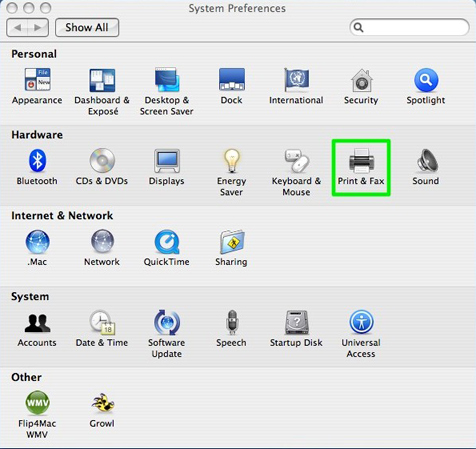
How To Set Up Mac OSX To Print to a Windows Print Share

I found one annoyance about Mac OSX. I could not figure out how to set my Mac up to print to our shared printer that is connected to a Windows XP machine.

Well, thats not necessarily true. I figured it out once, but for some reason it just stopped working using the standard printer setup. Since then, I’ve been printing to PDF, emailing the document to myself, and grabbing it on the machine with the printer and printing the PDF. Since we were setting up Jonna’s new Vista machine anyway and working through those connectivity issues, I decided to work on getting printing to work for real.

After culling through a bajillion posts today, I finally figured out how to do it. I figured this ‘pictorial’ could give you all of the steps you need to do without having to go through the effort that I did to get the information.

As an aside, all images were grabbed and marked up using Skitch.

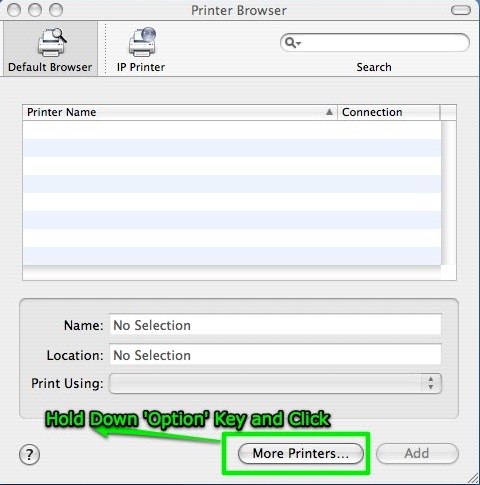
smb-printer-setup-step1

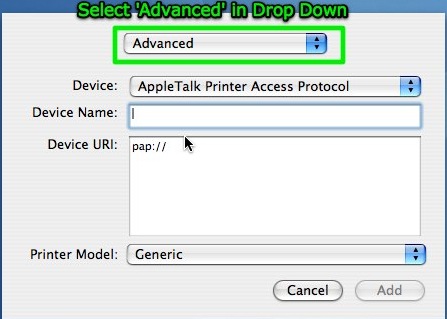
smb-printer-setup-step2

smb-printer-setup-step3

Apple made it very non-intuitive to get to the advanced options. You have to hold down the Option key, then click “More Printers” in order to get to it. This annoyed me. The advanced option should be there no matter what. I shouldn’t have to do anything special to add the smb: address of the printer.

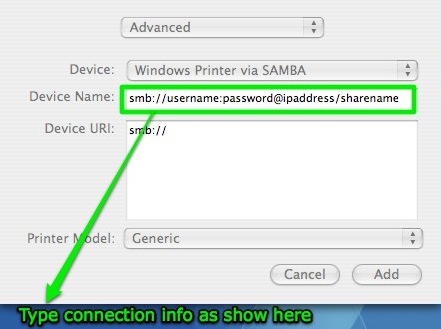
smb-printer-setup-step4

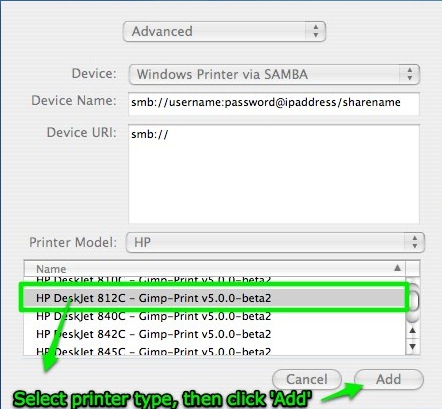
smb-printer-setup-step5

smb-printer-setup-step6

‘username:password’ is the username and password to log into the Windows machine with. IP Address is the IP of the Windows machine with the printer, and finally share name is the name you gave to the printer when you shared it.

smb-printer-setup-step7

I hope this “graphical representation” of the process helps you get your shared printers up and running. This is what I needed. Rather, I had to read through many false starts and theories before getting to the meat of the issue, which was essentially getting to the ‘Advanced’ options in the print manager. Now you know the secret. Happy printing!

Customer Experience Managers At Best Buy – A Bad Experience Turns Good

So we’re browsing around Best Buy yesterday and I see this 17″ Gateway machine that is on sale for $699. Jonna has needed a new machine for a while. The one she is using is one I bought her for her birthday about 4-5 years ago. Its a little slow, the screen is small, and the CDROM drive is on the blink, making it hard to rip music from CD to her MP3 player.

As we’re looking around, a young kid named Curt asks us if he can help us. We tell him we are just browsing, and he follows up with “if you need anything, my name is Curt, just yell if I can help you”. We nod in the affirmative and continue browsing.

There was quite a bit of debating back and forth. I was adamant that Jonna needed her own machine, that was just hers and not shared with the kids, and that actually was a little more up to date. She didn’t want to drop the money – even knowing it was on sale (a clincher for Jonna when things are in the low 2 figure ranges) wasn’t working.

So we left. We walked around the strip mall in McHenry, and I continued to persist that I wanted to get her this laptop. Finally, she relented and we walked back into the store.

I looked for Curt. He told us to grab him if we needed something. I like to grab the first person that talks to us when I have made a buying decision, so that they get credit or whatever for the sale. After about 5 minutes, I spot him across the store. I walk over to him and ask “So, do you want to sell me a laptop?”

His response floored me. It was, literally, “I don’t know, do I?”

Now, I’ve read a lot of sales books. I think the answer to this question should be “YES”. But, I guess he’s a kid and he doesn’t know any better, so I answer the question for him in the affirmative – “I think you do”.

We take him over to the laptop and I say “I want this one”. I’m one of those guys who doesn’t like a lot of cruft in the sales process. If I know what I want, you should give it to me with as little hassle as possible. Let me spend the money I’ve decided to spend, without a long conversation.

He starts to ask us what we are using it for. “School?” “No.” “Do you need MS Office”? “No, I need a laptop”. I think you can imagine how long this went on.

He disappears for a while after asking me to fill out a form. This is the first time I’ve ever been asked to fill out a form to buy a computer, but I comply. He’s gone for like, 10 minutes. He comes back and tells us that the store is out of these sale laptops, but there are 5 in Vernon Hills and other various locations. I ask him if they can reserve the inventory in the other stores, he says they can’t. Period. I guess we’re not buying a laptop. We begin to walk out.

I’m shocked that no one wants to work with me and take money that I have decided (and am adamant) to spend.

On our way out I see a guy with a name tag with the title “Customer Experience Manager”. I’ve read about these guys. Best Buy is putting them in all their stores to ensure a good customer experience. I haven’t had one so far, but I decide I’m going to give them another chance.

We go through a much abbreviated discussion with him. We find out the sale ends today, so he goes and gets next weeks flyer to see if there is anything comparable. I mention the inventory in the other stores and ask him if they can call and reserve one of them. He answers in the negative. It doesn’t work like that. We ask if they can have the inventory transferred to this store from the other one. They can, but it takes about 8 days, because the machine would go back to their distribution center and THEN to the McHenry store. I’m ready to just call it quits.

Then this guy brings up an idea. If you order it online for in store pickup, they will pull the inventory and have it waiting for you at the front when you get there. What a great idea! He takes us to their web site on one of their store kiosks, fills the cart for us, and allows me to log in and place the order. We now have the machine ordered (and the inventory reserved) and can go to Vernon Hills to pick it up.

This guy went out of his way to help us and present us with options. He didn’t try to sell us a bajillion options, he was just dealing with our problem. He was also able to think completely outside the box and came up with an idea that would get his customer what they wanted, and keep the money I wanted to spend in his store rather than have me walk out with it. More than that, I felt really good AND HELPED when I walked out to start our trek out to Vernon Hills.

Unfortunately, I don’t have this guys name – yet. I’ll be calling Best Buy today and finding this out, so that I can send a letter commending him for going the extra mile for us. I was very impressed. Not only did he solve my problem, but he did it with much less hassle than Curt did when I walked out with nothing.

So, Customer Experience Manager Guy, great job. Jonna now has a workable laptop and my wallet is a little lighter – and I feel good about my experience at your store.

Agile / Lean or Common Sense and Permission To Change?

As anyone who reads this blog regularly knows, I’ve spent a lot of time over the last 3-4 years studying agile methodologies and most recently lean concepts and principles. I have most recently been reading a couple of books by Ricardo Semler, who runs his company in a completely democratic way – doing away with all top down authoritarian management principles and allowing the employees to make decisions on dress, salaries, where they work, when they work, and most importantly, how they work.

I remember when I had first read the book Agile Software Development with SCRUM by Ken Schwaber and Mike Beedle and I had sent an email to my manager with a link to the book and the small sentence fragment “common sense codified”. We began experimenting with Scrum within my group, but it was very difficult to get other groups on the same page. We wound up with a lot of sprints that ended when things left development and entered the “normal corporate process” to finish things up and get them to production. We also had a lot of conversations around whether what we were doing was “standard process”.

As I started reading books on TPS and Lean, the same thing occurred. It struck me how most of the things that are characterized by “lean” are just common sense principles explained in such a way that they sound like a “process” that manager types can “buy into”. But really, they work because they make sense – and people have the permission to standardize and then change their work rather than having things written down and subsequently treating these processes like they are set in stone. You can’t change them unless you go through an agonizing approval process up the management chain.

Over the years, I’ve read and listened to many podcasts talking about the same things going on in other companies. People struggle to be able to change the way they work because they have to get “management buy-in” to take action. So much wasted effort just to try something new.

Interestingly, once the “buy-in” occurs, over and over again people try to “implement Scrum” or “do XP”, mostly by the book, and do not throw out things that do not work for the group. For some reason, we all think we have to be a part of some “methodology” in order to be effective.

One of the most fascinating things about Semlers company is the explicit trust and ability to control ones own destiny that the employees of Semco seem to receive. I ran across a particular section of the book where he was talking about the process improvements that “just started happening” due to this culture change and I found some interesting similarities to lean that I thought would be interesting to highlight. He starts off with:

The factory committee spun off groups that studied the plants products and how the workers made them, looking for ways to save time and make improvements. These teams weren’t created by Semco; they formed spontaneously, as the bracing winds of democracy swept through the food service equipment unit, and often met after hours or during lunch.

Interesting, employees actually wanted to do a better job and self organized because they could.

He goes on, talking about some of the changes:

One group restructured the dishwasher assembly line, changing it from a sequential assembly process to a batch concept in which dishwashers are assembled in twos and threes by teams of workers that do many different tasks and spend the time between batches prefabricating the components they will soon need. They also came up with a system in which all the parts for the dishwashers were stocked in open racks in the middle of the factory. Metal tags, green on one side and red on the other, hung on each rack, and the workers would flip the tags when they saw it was time to reorder, ensuring a steady supply. This was a big improvement on the traditional assembly line, in which dehumanized workers have no role in decisions regarding the production process.

What we see here are people electing to move from an assembly line to, basically, work cells implementing small batches of inventory with workers that are skilled in multiple areas. They even set up a “Kanban” system, though I doubt they knew it, where they had visual cues of when parts needed to be supplied.

Note that not once in these paragraphs does he mention the word “lean”. There was no implementation of “lean”, no “lean” or “continuous improvement” initiatives. This just seemed to make sense to the people doing the work and since they were allowed to do it – and knew enough about the overall process rather than just their small piece of the overall process (i.e. they were multi-skilled), they were able to see the obvious and execute it without all of the red tape – and get great results for the company.

He goes on:

The strength of these groups was their diversity. They included factory workers, engineers, office clerks, sales reps and executives. They didn’t have a formal head; whoever showed the greatest capacity to lead got the job, calling meetings and moderating discussions. In more than one group, a shop-floor worker guided professionals. Instead of a seniority system, or boxes on an organizational chart that guaranteed power, the groups were held together by a natural system of collegial respect.

Again, you hear this a lot in TPS. People are trained from the bottom up in the company and have skills in multiple areas. While there are “leads” that are responsible for a product line, everyone has the ability to lead when they are the most skilled for the job at hand.

The only vague reference to lean that Semler makes in this passage is the following paragraph, where he draws similarities and differences between what Semco did and TPS (though Toyota is not explicitly stated):

There are similarities between this system and the Japanese approach to organizing manufacturing operations, but also important differences. In our groups, younger members didn’t automatically submit to their elders. Moreover, once a team decided an issue, it stayed decided. There was no approval needed to make a change. Then again, there were no special rewards for new ideas. It was a spontaneous process; people participated only if they wanted to.

As I read this it really got me thinking. In most of the process agile / lean related books that I’ve read there seem to be a few common themes:

  • Trust people to do the right thing for the company
  • Give them freedom and authority to work the way they want to
  • Push decisions down the chain as far as possible
  • Work in small batches and change things that aren’t working
  • Allow those who are capable of leading to lead, no matter what their title or position is
  • Put quality checks in place – whether it be test-driven development, or quality checks at each step in an assembly
  • Fix problems at the core and stop the line as quickly as possible – in development this would be TDD and automated builds. Once a problem is found, find the root cause and put a test or quality check in place to ensure it doesn’t happen again
  • and finally, Trust people to do the right thing for the company

One more principle that I would add would be “tolerate mistakes”. Many of the issues that I’ve come across with other groups is that if they make a mistake they feel they will be punished. I’ve had great success with my team in articulating that I know mistakes will be made, but I want them to be made once, a lesson learned, and things put in place (usually automated) to ensure they won’t happen again. I’ve found that if people know it is expected that mistakes will be made, and everything doesn’t have to be perfect, they are more receptive to trying something new.

But I digress.

What Semler’s story shows me is that if people are given the freedom to work the way that is most effective, they will. More than that, if you invest in them with trust, they will want to do these things as their commitment to the company will obviously go up based on how they feel they are treated.

Semler uses a key phrase throughout his books that is repeated over and over. “Treat people like adults”. Semco, Toyota, Amazon and Google seem to do a really good job at this, as I’m sure most high functioning companies do. Read this article called The Google Way: Give Engineers Room and you will see the same concepts outlined in the excerpts on Semco that I have just written about. It seems to be a common theme.

So my real question. Is methodology and process really the answer, or is it deeper than that? Is it the way we treat employees that cause inefficiencies? If it is, if we took this base principal of trust and actually implemented it, would our employees come to the same conclusions as companies like Semco, Toyota and Google?

I think they would, because the principles and processes implemented by these companies are really just common sense without all of the complications of “process” and authoritarian management. They encourage workers to work outside their “box” and learn what they need to learn to be more effective. I would guess these employees feel valued, because they can constantly improve themselves rather than just “be the guy that puts the screw in the hole”. When you are allowed to improve yourself, your commitment rises to those who “allow” you to do so. What you wind up with is a highly efficient company that can change on a dime because people are allowed (and encouraged) to change and improve.

Most interestingly, the processes wind up looking “agile” or “lean”, without all the cruft of trying to follow a cook book.

Am I officially becoming a hippie, or does this line of thinking make sense? Let me know if I should go join a commune.

LDAP Enabling The Eventum Defect Tracking System

Due to a recent reorg, I have the opportunity to replace our defect tracking system, which has quite a bit of really wasteful process baked into the tool, with a new one. I’ve been looking at defect tracking software for a while, and chose Eventum, an open source project by MySQL AB for a number of reasons, some of them including:

  • Its open source
  • Its written in PHP, so I don’t have to worry about messing with fastcgi, mod_perl, or mod_python
  • It is extensible (you can add custom fields, etc)
  • It uses MySQL, rather than SQLLite or something like that, so we can integrate it into the rest of our home-grown build software
  • It supports email integration. While we won’t be using this right away, we’ll be implementing it in a later iteration
  • Its simple to use, with a very simple interface, once you get use to it. Everything is essentially on one screen.
  • It has time tracking, along with some basic reporting built in

One thing it doesn’t have built in is LDAP authentication. I wrote a previous article about all of the work we’ve done to integrate both our home grown applications and a few open source applications in with our LDAP store, to minimize the management of multiple passwords across systems, so this was very important to me. I started with many, many Google searches to see if someone else has done this, only to hit one dead end after another. At first I was being lazy and decided to just forget about it. One system not tied to the LDAP tree isn’t that big of a deal, but then my perfectionism set in. Why would I settle for that when LDAP authentication should be really easy to integrate into an Open Source package?

So I decided to spend a few hours to get it working. Since I had no success finding an implementation, I figured I could do my part and post what I have. There are a couple of caveats that I want to throw out before we actually get to the code though:

  1. It isn’t done “right”. This is all extra work for me, so I got enough done so that it would work. The right way to do this would to refactor the auth stuff out into a workflow like hierarchy that could be pluggable (see this post in the eventum mailing list). I’ll get to that someday, but right now this solution hacks the auth module to get authentication working.
  2. LDAP Settings are not configurable through the interface. I don’t have time for that, so a set of defines at the top of the LDAPAuthenticator class contains all of the configuration information for the LDAP server. Bummer, but like I said, I’m on a schedule.
  3. Users still have to be added to the Eventum database – they are not added automagically when they log in. I want control of who is in the system, so I’ve elected to leave this functionality out and just do authentication.

With these three caveats in place though, given my experience looking around for this stuff, at least this code works and will be able to be used by others. Its a starting point – which is more than is out there today. Anyone is free to use this and take the time to do it right. With that said, I’d love to receive updates if someone actually takes this up. For now though, this works for me.

So, now to the code. I wrote a small PHP class called “class.LDAPAuthenticator.php. There are two functions in it. Because Eventum uses email address as the login, we need a way to get the full user DN from the email address. This is what the email_to_dn function does. Given an email address, it returns the full distinguished name of the user. This is called by the main class function, ldap_authenticate. The ldap_authenticate function takes the same arguments as the class.auth.php function isCorrectPassword, which consist of the email address and the password. It binds to the LDAP authentication tree using the full DN of the user and the password supplied. If authentication is successful, it returns TRUE, otherwise it returns FALSE, just like the isCorrectPassword function used to validate the password from the Eventum database.

The code looks like this:

# Change these values to access another LDAP server.
define("LDAP_PORT", 636);
define("LDAP_HOST", 'ldaps://ldapserver.example.com:' . LDAP_PORT);
define("LDAP_BIND_DN", 'PUT THE BIND DN HERE');
define("LDAP_BIND_PASSWORD", 'PUT THE BIND PASSWORD HERE');
define("LDAP_SEARCH_DN", "PATH OF THE TREE TO SEARCH FOR USERS");

class LDAPAuthenticator {

# Look up a users full distinguised name from
# their email address, since Eventum uses
# email address as the login name.
function email_to_dn($emailAddress) {
$returnDN = "";

$server = ldap_connect(LDAP_HOST);

if ($server == FALSE) {
return($returnDN);
}

ldap_set_option($server, LDAP_OPT_PROTOCOL_VERSION, 3) ;

$ldapbind = ldap_bind($server, LDAP_BIND_DN, LDAP_BIND_PASSWORD);

# verify binding
if ($ldapbind) {
# find the user based on the entered email address.
$result = ldap_search($server,
LDAP_SEARCH_DN,
"(&(mail=$emailAddress))",
array("dn"));

$info = ldap_get_entries($server, $result);

# if we actually got a value back, return the users DN
if ($info["count"] > 0) {
$returnDN = $info[0]["dn"];
}

ldap_unbind($server);
}

return($returnDN);
}

# Authenticate with the LDAP server. Function returns true
# if authentication was successful, false otherwise.
function ldap_authenticate($email, $password) {
$returnValue = FALSE;
$userDN = LDAPAuthenticator::email_to_dn($email);

if ($userDN == "") {
return($returnValue);
}

$server = ldap_connect(LDAP_HOST);

if ($server == FALSE) {
return($returnValue);
}

ldap_set_option($server, LDAP_OPT_PROTOCOL_VERSION, 3) ;

$ldapbind = ldap_bind($server,
LDAPAuthenticator::email_to_dn($email),
$password);

if ($ldapbind) {
$returnValue = TRUE;
ldap_unbind($server);
}

return($returnValue);
}
}

Save this file as class.LDAPAuthenticator.php and put it in your Eventum includes directory. Modify the define statements at the top to contain your LDAP server information.

Now, to use it. Go to your Eventum includes directory and add the following line to the top of the class.auth.php file:

require_once(APP_INC_PATH . "class.LDAPAuthenticator.php");

I have this at the end of all of the rest of the require statements.

Now, replace the isCorrectPassword function in class.auth.php with the following function:

 /**
* Checks whether the provided password match against the email
* address provided.
*
* @access public
* @param string $email The email address to check for
* @param string $password The password of the user to check for
* @return boolean
*/
function isCorrectPassword($email, $password) {
return(LDAPAuthenticator::ldap_authenticate($email, $password));
}

… and VOILA. You can now authenticate off of your LDAP tree.

Now, I know it isn’t pretty, hacking the code directly – but it works, and its more of a starting point than I can find anywhere else. I hope its useful to others. Again, if anyone takes this further and does it “right”, I would be really happy to get a copy of the modifications.

One more thing – don’t forget to require SSL on the URL to your Eventum installation by using the SSLRequireSSL directive in your Apache server. You don’t want these passwords floating around in the clear across the network.

Download the Eventum LDAP hack here and happy authenticating.

Current Reading – Maverick by Ricardo Semler

While I still have a few books in the queue mainly focused around TPS, I started reading Maverick: The Success Story Behind the World’s Most Unusual Workplace, the prequel to The Seven-Day Weekend: Changing the Way Work Works.

Not too far into it yet, but riveted again. Pretty amazing story. Highly recommend both books.

I’m really curious about a lot of the ideas in these books, and how they would work in a traditional company. I know I’ve made little adjustments in this direction even before reading the books, but now I’m really curious as to how extreme you can go. Ricardo seems to have had great success going more extreme than most. I admire his idealism and his trust in people.